Pro Guide 22 Jan 2026
Feature 6: Quick Pre-Render
For Architects/3D Artists. Turn 'Clay' or 'White' models (SketchUp/Revit screenshots) into realistic renders instantly.
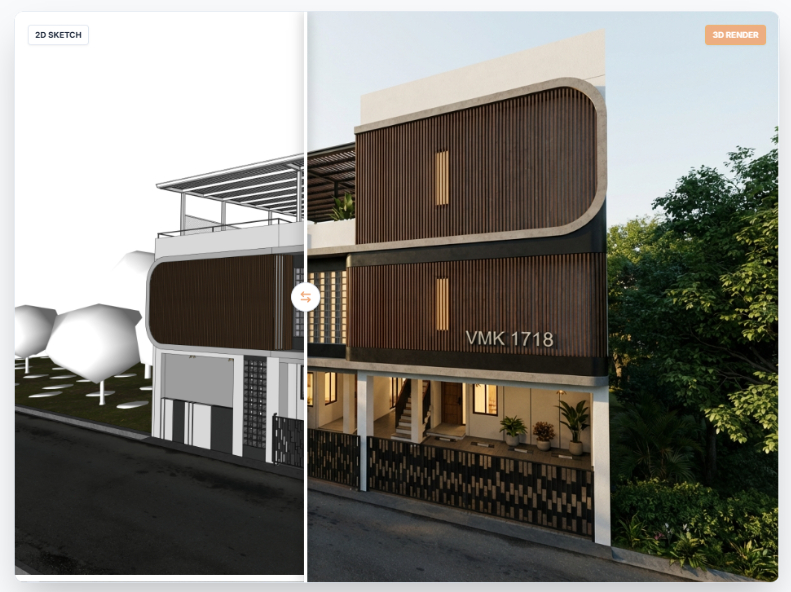
Mode: Pre-Render (Layers Icon)
Turn "Clay" or "White" models (SketchUp/Revit screenshots) into realistic renders instantly.
Workflow
- Export: Take a screenshot of your untextured 3D model.
- Upload: Select
Pre-Rendermode and upload the screenshot. - Describe Materials: In the "Additional Notes", explicitly list textures.
Example: "Polished concrete floor, white plaster walls, oak wood ceiling slats." - Lighting: Select "Sunset" or "Night" to test lighting scenarios without re-rendering in V-Ray/Lumion.
Read Next
From Sketch to Blueprint: The Power of the AI Floor Plan Generator
How text prompts and simple doodles can instantly become professional 2D floor plans.
Read Article →Feature 2: Draw Manual Plan
Precision CAD-like drawing tool for when AI needs specific guidance on wall lengths and room arrangements.
Read Article →